[Go] autopprof로 pprof 임계 알림 설정하기
당근에서 만든건데, 유용해보여서 한번 달아보려 한다.
도커 컨테이너 내에서 cpu나 메모리 수치 등을 모니터링해서 slack에 보고를 날려주는 것이다. 컨테이너 내에서만 동작하며, pprof를 기반으로 동작한다.
슬랙 봇 구성
우선 app 기반의 봇을 구성할 필요가 있다.
별도 포스트를 참고한다.
https://blog.naver.com/sssang97/223176628812
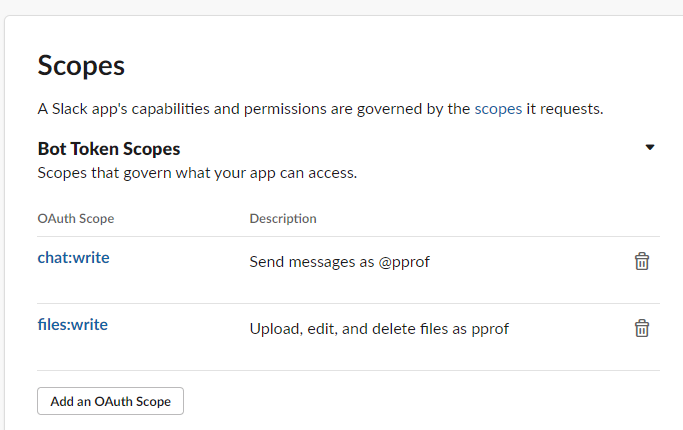
그리고 파일 쓰기 권한도 필요하다.
이정도 권한만 주면 될 것이다.
스트레스 코드
일단 테스트를 위해서는 스트레스 코드가 조금 필요했다.
메모리와 cpu를 괴롭히는 코드다.
package internal

type mm struct {
	m map[int64]string
}

func EatMemory() {
	m := make(map[int64]string, 20000000)
	for i := 0; i < 20000000; i++ {
		m[int64(i)] = "eating heap memory"
	}
	_ = mm{m: m}
}

// Iterative fibonacci func implementation.
func Iterative(n int) int64 {
	var a, b int64 = 0, 1
	for i := 0; i < n; i++ {
		a, b = b, a+b
	}
	return a
}

// Recursive fibonacci func implementation.
func Recursive(n int) int64 {
	if n <= 1 {
		return int64(n)
	}
	return Recursive(n-1) + Recursive(n-2)
}
서버 코드
autopprof를 설정하고, 서버를 띄우면 된다.
그리 복잡하지는 않다. 알림을 띄울 임계값을 지정하고, 슬랙에 알림을 날릴 정보를 입력해주면 끝이다.
package main

import (
	"errors"
	"fmt"
	"just_test/internal"
	"log"
	"net/http"
	_ "net/http/pprof"

	"github.com/daangn/autopprof"
	"github.com/daangn/autopprof/report"
)

func fibonacci(n int) int {
	if n <= 1 {
		return n
	}
	return fibonacci(n-1) + fibonacci(n-2)
}

func setupReporters() {
	err := autopprof.Start(autopprof.Option{
		CPUThreshold: 0.3, // Default: 0.75.
		MemThreshold: 0.3, // Default: 0.75.
		Reporter: report.NewSlackReporter(
			&report.SlackReporterOption{
				App:     "pprof", // 앱이름
				Token:   "x...b-138......aN2bTKh6", // oauth 토큰
				Channel: "C5.....", // 채널ID
			},
		),
	})
	if errors.Is(err, autopprof.ErrUnsupportedPlatform) {
		log.Println(err)
	} else if err != nil {
		log.Fatalln(err)
	}
}

func main() {
	setupReporters()

	// 간단한 http 서버 예제
	http.HandleFunc("/", func(w http.ResponseWriter, r *http.Request) {
		fmt.Fprintf(w, "Hello, World!")
	})

	http.HandleFunc("/stress/memory", func(w http.ResponseWriter, r *http.Request) {
		go func() {
			internal.EatMemory()
		}()

		fmt.Fprintf(w, fmt.Sprintf("stress test"))
	})

	http.HandleFunc("/stress/cpu", func(w http.ResponseWriter, r *http.Request) {

		internal.Iterative(100000)
		internal.Recursive(1500)

		fmt.Fprintf(w, fmt.Sprintf("stress test"))
	})

	fmt.Println("서버 시작 중...")
	err := http.ListenAndServe(":8080", nil)
	if err != nil {
		fmt.Println("서버 시작 실패: ", err)
	}
}
일부 api에서는 일부러 부하를 가하도록 했다.
그리고 도커로 말아서 ECS Fargate로 띄웠다.
FROM golang:1.20-alpine3.16 AS builder
COPY . /home/app
WORKDIR /home/app
RUN go mod tidy
RUN go build -o server ./cmd/main.go

FROM alpine
RUN mkdir /home/app
WORKDIR /home/app
COPY --from=builder /home/app/server /home/app/server

ENTRYPOINT [ "/home/app/server" ]
이게 WSL docker로도 안되고, 리눅스만 되는 것 같더라.
Mac은 테스트를 해보진 않았다.
아무튼 서버를 띄우고 강제로 부하를 주면
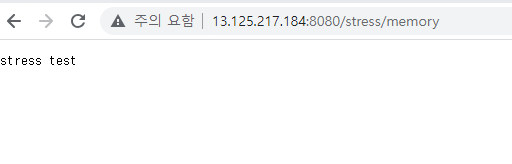
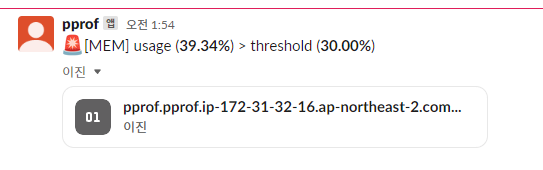 이런식으로 잘 날라올 것이다.
파일은 pprof profile 파일이다.
참조
https://github.com/daangn/autopprof