[Clickhouse] 시스템 로그 정리
Clickhouse는 기본적으로 쿼리나 내부 로그를 아끼지 않고 푸짐하게 저장하는 편이다.
그래서 실컷 쓰다가 까보면 로그가 무시할 수 없을 정도로 쌓여있을 확률이 매우 높다.
SELECT
database,
table,
formatReadableSize(sum(bytes)) AS size,
sum(rows) AS rows,
max(modification_time) AS latest_modification,
sum(bytes) AS bytes_size
FROM system.parts
WHERE active
GROUP BY database, table
ORDER BY bytes_size DESC
LIMIT 20;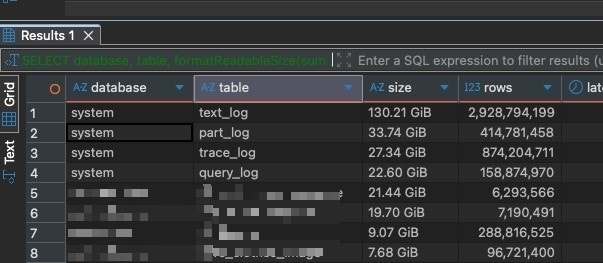 몇백기가씩이나 먹고 있다.
part_log는 MergeTree의 내부 쓰기, 병합과 관련된 로그고, text_log는 일반 로그 전반, query_log는 개별 쿼리에 대한 기록이다.
당연히 이런 로그 데이터들은 전체 보존을 할 필요까진 없으므로, 적절히 지워주는 것이 좋다.
시원하게 다 날리려면 truncate를 날리는게 좋고
TRUNCATE TABLE system.text_log;
TRUNCATE TABLE system.part_log;
TRUNCATE TABLE system.trace_log;
TRUNCATE TABLE system.query_log;
아니면 시간 기준으로 오래된것만 적당히 지울 수도 있다.
ALTER TABLE system.text_log DELETE WHERE event_date < today() - 30;
ALTER TABLE system.part_log DELETE WHERE event_date < today() - 30;
ALTER TABLE system.trace_log DELETE WHERE event_date < today() - 30;
ALTER TABLE system.query_log DELETE WHERE event_date < today() - 30;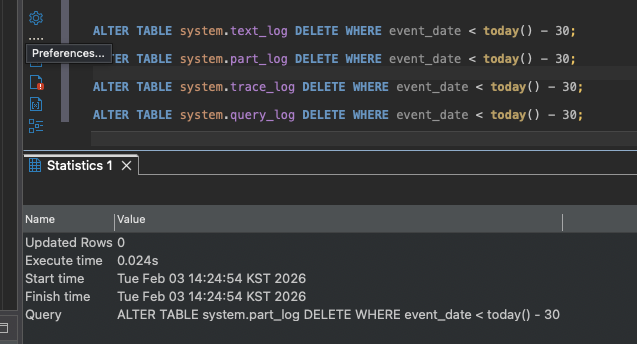 이건 partition 병합을 자동으로 하진 않으니 즉시 정리가 되진 않는다. 당장 비우길 원한다면 삭제한 이후에 optimize 돌려서 삭제된 행을 제거해야 한다.
TTL 설정
상기한 쿼리를 cron으로 돌려서 오래된 로그를 지우게 할 수도 있지만, 그냥 시스템 테이블 자체에 TTL을 걸 수도 있다. 다만 이 방법은, 일반 테이블이 아니라 시스템 테이블이라서 억지로 적용하더라도 재시작 시에 초기화된다는 단점이 있다.
그래서 가장 확실한 방법은 clickhouse의 xml 설정파일을 수정하는 것이다.
경로 찾아서 파일 만들어서 TTL 옵션을 넣고
sudo vim /etc/clickhouse-server/config.d/system_tables_ttl.xml<?xml version="1.0"?>
<clickhouse>
<text_log>
<database>system</database>
<table>text_log</table>
<flush_interval_milliseconds>7500</flush_interval_milliseconds>
<engine>ENGINE = MergeTree PARTITION BY (event_date) ORDER BY (event_time) TTL event_date + INTERVAL 14 DAY DELETE SETTINGS ttl_only_drop_parts=1</engine>
</text_log>
<query_log>
<database>system</database>
<table>query_log</table>
<flush_interval_milliseconds>7500</flush_interval_milliseconds>
<engine>ENGINE = MergeTree PARTITION BY (event_date) ORDER BY (event_time) TTL event_date + INTERVAL 14 DAY DELETE SETTINGS ttl_only_drop_parts=1</engine>
</query_log>
<trace_log>
<database>system</database>
<table>trace_log</table>
<flush_interval_milliseconds>7500</flush_interval_milliseconds>
<engine>ENGINE = MergeTree PARTITION BY (event_date) ORDER BY (event_time) TTL event_date + INTERVAL 14 DAY DELETE SETTINGS ttl_only_drop_parts=1</engine>
</trace_log>
<part_log>
<database>system</database>
<table>part_log</table>
<flush_interval_milliseconds>7500</flush_interval_milliseconds>
<engine>ENGINE = MergeTree PARTITION BY (event_date) ORDER BY (event_time) TTL event_date + INTERVAL 14 DAY DELETE SETTINGS ttl_only_drop_parts=1</engine>
</part_log>
</clickhouse>재부팅까지 해주면 된다.
sudo systemctl restart clickhouse-server이 적용은 당연히 다운타임이 수반된다.
이렇게 하면 로그가 14일까지만 보존되고 제거될 것이다.